Stream Deck
An Elgato Stream Deck provides hardware buttons for lights, media, and shortcuts. Two devices are connected:
| Device | Model | Buttons | Connected to |
|---|---|---|---|
| Stream Deck (15-key) | 20GAA9902 | 5 × 3 grid | mini, studio |
| Stream Deck Pedal (3-key) | 20GBF9901 | 3 × 1 strip | studio |
Profiles
The 15-key deck switches between profiles with a dedicated button:
| Profile | Purpose |
|---|---|
| Meetings | Lights (Elgato Key Light, Philips Hue), mute toggle, media controls, sleep |
| AV Setup | Light temperature and brightness, media, CPU monitor |
| Profile 1 | Hotkeys for window management |
The 3-key deck uses a single Default Profile with desk lights, mute toggle, and media.
Mac Studio launcher page
On the Mac Studio, page 2 of the 15-key deck's default profile is an app
launcher. Each key opens an app from /Applications. The bottom corners
switch pages and wrap around between pages 1 and 3.
The key images use the Dracula theme, to
match the terminal and these docs. The keys have a Dracula background
(#282a36) and foreground labels (#f8f8f2), and the navigation keys
have pink chevrons and purple page dots. App icons are left as they
are. Each layout spec picks its theme with a top-level "theme" key
(default or dracula).
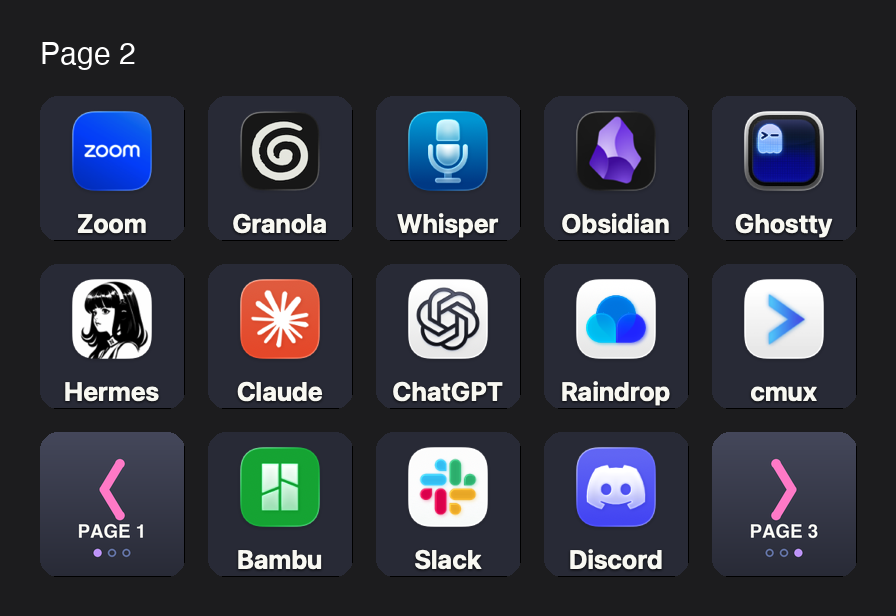
| Row | Keys |
|---|---|
| Top | Zoom, Granola, MacWhisper, Obsidian, Ghostty |
| Middle | Hermes, Claude, ChatGPT, Raindrop.io, cmux |
| Bottom | Previous page, Bambu Studio, Slack, Discord, Next page |
The page is defined as a JSON spec (layouts/mk2-page2.json) and
written to the Stream Deck app's profile by scripts in
~/Projects/stream-deck, not built by hand in the app:
| Script | Purpose |
|---|---|
scripts/sdconfig.py |
Dump, export, and apply page layouts to the app's profiles (stdlib only) |
scripts/keyicon.py |
Render a key image from an app's icon with the label baked in (pyobjc) |
scripts/navicon.py |
Draw the page navigation keys: chevron, target page, page dots (Pillow) |
All three are PEP 723 scripts, so they run with uv run:
cd ~/Projects/stream-deck
uv run scripts/sdconfig.py export --page DFE14820 \
    --like layouts/mk2-page2.json --out layouts/mk2-page2.json
uv run scripts/sdconfig.py apply layouts/mk2-page2.json            # dry run
uv run scripts/sdconfig.py apply layouts/mk2-page2.json --apply    # write
apply is a dry run unless you pass --apply. Before it writes, it
backs up the profile to .sdconfig-backups/ outside ProfilesV3/. It
won't write while the Stream Deck app is running (see below).
Editing profiles
The Elgato Stream Deck app owns the config files under
~/Library/Application Support/com.elgato.StreamDeck/ProfilesV3/. Each
.sdProfile directory contains a manifest.json and per-page manifests
under Profiles/.
The app writes its in-memory state back to disk, so edits made while it is running are silently reverted. To edit the JSON directly:
osascript -e 'quit app "Elgato Stream Deck"'
# ... edit the manifest.json ...
open -a "Elgato Stream Deck"
Button grid coordinates
Keys in the manifest use "col,row" coordinates (zero-indexed,
origin at top-left):
Common action UUIDs
| Action | UUID | Settings |
|---|---|---|
| Key Light on/off | com.elgato.controlcenter.lights-on-off |
deviceID, name |
| Philips Hue on/off | com.elgato.philips-hue.power |
bridge, light |
| Philips Hue scene | com.elgato.philips-hue.scene |
bridge, light, scene |
| Philips Hue color | com.elgato.philips-hue.color |
bridge, light, color |
| Multimedia | com.elgato.streamdeck.system.multimedia |
actionIdx (0=mute, 1=play/pause, 3=prev, 4=next, 5=vol up, 6=vol down) |
| Hotkey | com.elgato.streamdeck.system.hotkey |
Hotkeys[] with key codes |
| Website | com.elgato.streamdeck.system.website |
openInBrowser, path |
| Switch Profile | com.elgato.streamdeck.profile.rotate |
ProfileUUID |
| Sleep | com.elgato.streamdeck.system.sleep |
DeviceUUID |